Monday, June 21, 2010

Tuesday, June 8, 2010
There's No Substitude for Speed by Bruce Stein
Photo Tip of the Month 
There's No Substitute for Speed by: Bruce Stein
In one of the strangest ironies in photography, the least expensive lens in any manufacturer’s line is also one of the best tools that you can have in your camera case. The 50mm f/1.8 used to be the “kit” lens that they included with most cameras up until the mid 1980s when the quality of zoom lenses became good enough that most people were willing to give up the speed of the 50mm lens for the versatility of a zoom. When talking about lenses, speed refers to the maximum or widest aperture that the lens will shoot at permitting more light to enter the camera and allowing you to shoot at a faster shutter speed. The byproduct of shooting with a faster lens is that you can also create much more depth than a slower zoom lens. Nowadays many people are shooting portraits of their own families, or family friends and are frustrated that they can’t blur out the background like the professionals and often come in asking how it’s done. The answer is the 50mm 1.8 lens, which gives a great focal length for an individual portrait and the speed (1.8) to blur out the background for a pleasing, professional looking portrait. I’ve included two sets of sample photos this month to illustrate the major advantages of using this lens; the first set demonstrates the difference between shooting at an aperture of f/1.8 indoors which allowed me to shoot at 1/60th of a second, but when shooting at f/5.6 I was only able to shoot at 1/8th of a second causing a slight camera movement which you will see in the lack of sharpness.
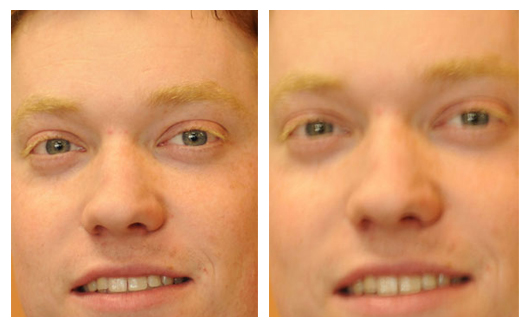 The second set of photos shows an example of the depth of field that you can get shooting at f/1.8 for a blurry background as compared to the sharper background when shooting at f/8.0.

There's No Substitute for Speed by: Bruce Stein
In one of the strangest ironies in photography, the least expensive lens in any manufacturer’s line is also one of the best tools that you can have in your camera case. The 50mm f/1.8 used to be the “kit” lens that they included with most cameras up until the mid 1980s when the quality of zoom lenses became good enough that most people were willing to give up the speed of the 50mm lens for the versatility of a zoom. When talking about lenses, speed refers to the maximum or widest aperture that the lens will shoot at permitting more light to enter the camera and allowing you to shoot at a faster shutter speed. The byproduct of shooting with a faster lens is that you can also create much more depth than a slower zoom lens. Nowadays many people are shooting portraits of their own families, or family friends and are frustrated that they can’t blur out the background like the professionals and often come in asking how it’s done. The answer is the 50mm 1.8 lens, which gives a great focal length for an individual portrait and the speed (1.8) to blur out the background for a pleasing, professional looking portrait. I’ve included two sets of sample photos this month to illustrate the major advantages of using this lens; the first set demonstrates the difference between shooting at an aperture of f/1.8 indoors which allowed me to shoot at 1/60th of a second, but when shooting at f/5.6 I was only able to shoot at 1/8th of a second causing a slight camera movement which you will see in the lack of sharpness.
Number then Rename those Digital Camera Files
Number then rename those Digi Files?
by: Dean Lawrence
So I recommend using a file numbering index system in the prefix part of the file name first, then use a meaningful name for the remainder of the file name to help describe the photo file.
Prefix the file number ahead of the file name description for best practices.
0001Hawaii_July2010.jpg is better than Smith family vacation in Hawaii July 2010img001.jpg
0002Hawaii_July2010.jpg is better than Smith family vacation in Hawaii July 2010img002.jpg
0003Hawaii_July2010.jpg is better than Smith family vacation in Hawaii July 2010img003.jpg
0004Hawaii_July2010.jpg is better than Smith family vacation in Hawaii July 2010img004.jpg
0005Hawaii_July2010.jpg is better than Smith family vacation in Hawaii July 2010img005.jpg
0006Hawaii_July2010.jpg is better than Smith family vacation in Hawaii July 2010img006.jpg
I highlighted the above 1st eight characters to show you what would typically be see on the back side of a photo print or under a photo thumbnail image on an index page or photo catalog page.
by: Dean Lawrence
This month we are introducing our new photo catalog books. I thought this would be a good time to mention a very common practice that I would recommend to our VIP Customers. Many of you my know already that our Photo Lab printers have the ability to print the file names on the back side of the photo paper. What you may not realized is, we only have the ability to print 8 - 10 characters. Often our customers tend to rename their digital camera files with long descriptive names of a vacation or special event. But at the end of the file name, this is a number sequence to indivualize each file. These long file don't work well at all for creating photo INDEX Prints, Locating files on a CD or DVD, and most importantly, located on the bottom of thumbnail images on our new Photo Catalog Books.
So I recommend using a file numbering index system in the prefix part of the file name first, then use a meaningful name for the remainder of the file name to help describe the photo file.
Prefix the file number ahead of the file name description for best practices.
0001Hawaii_July2010.jpg is better than Smith family vacation in Hawaii July 2010img001.jpg
0002Hawaii_July2010.jpg is better than Smith family vacation in Hawaii July 2010img002.jpg
0003Hawaii_July2010.jpg is better than Smith family vacation in Hawaii July 2010img003.jpg
0004Hawaii_July2010.jpg is better than Smith family vacation in Hawaii July 2010img004.jpg
0005Hawaii_July2010.jpg is better than Smith family vacation in Hawaii July 2010img005.jpg
0006Hawaii_July2010.jpg is better than Smith family vacation in Hawaii July 2010img006.jpg
I highlighted the above 1st eight characters to show you what would typically be see on the back side of a photo print or under a photo thumbnail image on an index page or photo catalog page.
Within our industry there is a widely known " irfanView " while our photo lab department has expert photoshop associates around, We use irfanView often for "Batch File Renaming"
I found some interesting links to YouTube videos that explain this procedure.
Subscribe to:
Posts (Atom)