Monday, June 21, 2010

Tuesday, June 8, 2010
There's No Substitude for Speed by Bruce Stein
Photo Tip of the Month 
There's No Substitute for Speed by: Bruce Stein
In one of the strangest ironies in photography, the least expensive lens in any manufacturer’s line is also one of the best tools that you can have in your camera case. The 50mm f/1.8 used to be the “kit” lens that they included with most cameras up until the mid 1980s when the quality of zoom lenses became good enough that most people were willing to give up the speed of the 50mm lens for the versatility of a zoom. When talking about lenses, speed refers to the maximum or widest aperture that the lens will shoot at permitting more light to enter the camera and allowing you to shoot at a faster shutter speed. The byproduct of shooting with a faster lens is that you can also create much more depth than a slower zoom lens. Nowadays many people are shooting portraits of their own families, or family friends and are frustrated that they can’t blur out the background like the professionals and often come in asking how it’s done. The answer is the 50mm 1.8 lens, which gives a great focal length for an individual portrait and the speed (1.8) to blur out the background for a pleasing, professional looking portrait. I’ve included two sets of sample photos this month to illustrate the major advantages of using this lens; the first set demonstrates the difference between shooting at an aperture of f/1.8 indoors which allowed me to shoot at 1/60th of a second, but when shooting at f/5.6 I was only able to shoot at 1/8th of a second causing a slight camera movement which you will see in the lack of sharpness.
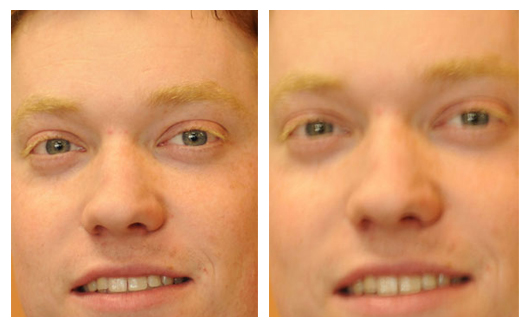 The second set of photos shows an example of the depth of field that you can get shooting at f/1.8 for a blurry background as compared to the sharper background when shooting at f/8.0.

There's No Substitute for Speed by: Bruce Stein
In one of the strangest ironies in photography, the least expensive lens in any manufacturer’s line is also one of the best tools that you can have in your camera case. The 50mm f/1.8 used to be the “kit” lens that they included with most cameras up until the mid 1980s when the quality of zoom lenses became good enough that most people were willing to give up the speed of the 50mm lens for the versatility of a zoom. When talking about lenses, speed refers to the maximum or widest aperture that the lens will shoot at permitting more light to enter the camera and allowing you to shoot at a faster shutter speed. The byproduct of shooting with a faster lens is that you can also create much more depth than a slower zoom lens. Nowadays many people are shooting portraits of their own families, or family friends and are frustrated that they can’t blur out the background like the professionals and often come in asking how it’s done. The answer is the 50mm 1.8 lens, which gives a great focal length for an individual portrait and the speed (1.8) to blur out the background for a pleasing, professional looking portrait. I’ve included two sets of sample photos this month to illustrate the major advantages of using this lens; the first set demonstrates the difference between shooting at an aperture of f/1.8 indoors which allowed me to shoot at 1/60th of a second, but when shooting at f/5.6 I was only able to shoot at 1/8th of a second causing a slight camera movement which you will see in the lack of sharpness.
Number then Rename those Digital Camera Files
Number then rename those Digi Files?
by: Dean Lawrence
So I recommend using a file numbering index system in the prefix part of the file name first, then use a meaningful name for the remainder of the file name to help describe the photo file.
Prefix the file number ahead of the file name description for best practices.
0001Hawaii_July2010.jpg is better than Smith family vacation in Hawaii July 2010img001.jpg
0002Hawaii_July2010.jpg is better than Smith family vacation in Hawaii July 2010img002.jpg
0003Hawaii_July2010.jpg is better than Smith family vacation in Hawaii July 2010img003.jpg
0004Hawaii_July2010.jpg is better than Smith family vacation in Hawaii July 2010img004.jpg
0005Hawaii_July2010.jpg is better than Smith family vacation in Hawaii July 2010img005.jpg
0006Hawaii_July2010.jpg is better than Smith family vacation in Hawaii July 2010img006.jpg
I highlighted the above 1st eight characters to show you what would typically be see on the back side of a photo print or under a photo thumbnail image on an index page or photo catalog page.
by: Dean Lawrence
This month we are introducing our new photo catalog books. I thought this would be a good time to mention a very common practice that I would recommend to our VIP Customers. Many of you my know already that our Photo Lab printers have the ability to print the file names on the back side of the photo paper. What you may not realized is, we only have the ability to print 8 - 10 characters. Often our customers tend to rename their digital camera files with long descriptive names of a vacation or special event. But at the end of the file name, this is a number sequence to indivualize each file. These long file don't work well at all for creating photo INDEX Prints, Locating files on a CD or DVD, and most importantly, located on the bottom of thumbnail images on our new Photo Catalog Books.
So I recommend using a file numbering index system in the prefix part of the file name first, then use a meaningful name for the remainder of the file name to help describe the photo file.
Prefix the file number ahead of the file name description for best practices.
0001Hawaii_July2010.jpg is better than Smith family vacation in Hawaii July 2010img001.jpg
0002Hawaii_July2010.jpg is better than Smith family vacation in Hawaii July 2010img002.jpg
0003Hawaii_July2010.jpg is better than Smith family vacation in Hawaii July 2010img003.jpg
0004Hawaii_July2010.jpg is better than Smith family vacation in Hawaii July 2010img004.jpg
0005Hawaii_July2010.jpg is better than Smith family vacation in Hawaii July 2010img005.jpg
0006Hawaii_July2010.jpg is better than Smith family vacation in Hawaii July 2010img006.jpg
I highlighted the above 1st eight characters to show you what would typically be see on the back side of a photo print or under a photo thumbnail image on an index page or photo catalog page.
Within our industry there is a widely known " irfanView " while our photo lab department has expert photoshop associates around, We use irfanView often for "Batch File Renaming"
I found some interesting links to YouTube videos that explain this procedure.
Tuesday, April 20, 2010
Help us celebrate Earth Day & get rewarded!
Help us celebrate Earth Day on April 22nd by bringing in empty ink cartridges, toners, or old cell phones and we'll give you one HooperBuck for each item you bring in to recycle.


RECYCLE & SAVE!
HooperBucks are worth $5! That's a 20% savings on any of our Photo Lab Services.
Here are some of the key items we recycle here at Hooper Camera:
• Photo chemistry waste, silver recovery from chemicals.
• Photo ink cartridges, toner.
• 35mm film canisters, plastic film containers.
• Disposable cameras.
• Computer monitors, electronics, etc.
• Plastic bottles, cans, etc.
• Plastic bottles, cans, etc.

Tuesday, April 13, 2010
Photo Tip of the Month - Tricks with tripods by: Bruce Stein
Often times we buy something for a single purpose and find out that the real fun begins when we explore new and different uses for that item; such is the case with tripods.
The obvious reasons to own a tripod are to steady the camera for longer than normal exposure times under available light conditions or to support the camera while shooting family or self portraits, both very valid reasons for owning a tripod. However, there are ways to use a tripod to make them more fun and less utilitarian and achieve cool special effects in the process. One such way of “playing” with the tripod is to try a panning motion shot, which can be accomplished without a tripod with less pleasing results, as you can see with the accompanying photos.

In the first photo I used the Promaster 7100 tripod and the car and the background are sharper than in the second photo where the camera movement is evident. Panning is a relatively easy method to achieve the effect of a reasonably sharp moving subject that shows that it is indeed moving. To best way to perform this function is to set your DSLR to the shutter priority mode and select a slower than normal shutter speed, typically less than one-thirtieth of a second I shot these at one-sixth of a second. In bright sun, you will probably need to use a neutral density filter (or a circular polarizing filter) to cut down the amount of light hitting the sensor to get your shutter down to the desired speed. From there all you do is follow the subject at approximately the same rate of speed that it’s traveling and when you feel that you’re tracking it at an even pace, snap the picture.
Good luck and have fun!

The obvious reasons to own a tripod are to steady the camera for longer than normal exposure times under available light conditions or to support the camera while shooting family or self portraits, both very valid reasons for owning a tripod. However, there are ways to use a tripod to make them more fun and less utilitarian and achieve cool special effects in the process. One such way of “playing” with the tripod is to try a panning motion shot, which can be accomplished without a tripod with less pleasing results, as you can see with the accompanying photos.

In the first photo I used the Promaster 7100 tripod and the car and the background are sharper than in the second photo where the camera movement is evident. Panning is a relatively easy method to achieve the effect of a reasonably sharp moving subject that shows that it is indeed moving. To best way to perform this function is to set your DSLR to the shutter priority mode and select a slower than normal shutter speed, typically less than one-thirtieth of a second I shot these at one-sixth of a second. In bright sun, you will probably need to use a neutral density filter (or a circular polarizing filter) to cut down the amount of light hitting the sensor to get your shutter down to the desired speed. From there all you do is follow the subject at approximately the same rate of speed that it’s traveling and when you feel that you’re tracking it at an even pace, snap the picture.
Good luck and have fun!
Wednesday, March 31, 2010
Wednesday, March 24, 2010
Thursday, March 4, 2010
Why print photos from digital?
by: Dean Lawrence
In this new digital age, we capture more digital images than ever before in recorded history. Some of us still use traditional film. Many of us are using digital cameras. Most of our young people are using cellular phone cameras. But what do we do after we capture those six billion photos taken last year.
Are we uploading them to online social media sites like Facebook, Flickr, MySpace, or others? Do they stay in our cell phone only to be lost when we replace our phones every six months with the latest models? Are the cellular phone companies storing them forever for us?
So now my images are online somewhere, I can share them via email, social media links, rss feeds, post on blogs or web sites.
Decades from now, will my family have access to those memories? Will future technologies be compatible to show our current generations digital images?
I myself find that I am shooting pictures of family and friends, clearing the media card off by uploading the images to my personal computer, then, maybe a few weeks later, burning a DVD so I can clear my drive. My images take quite a little journey after capture and often times the only person that sees them is me. Not good, and yes, shame on me.
Check out this funny Video about Why We Print Digital Photos?
Aritcle: Why I’ve Gone Back to Making Prints of Family Photos
In this new digital age, we capture more digital images than ever before in recorded history. Some of us still use traditional film. Many of us are using digital cameras. Most of our young people are using cellular phone cameras. But what do we do after we capture those six billion photos taken last year.
Are we uploading them to online social media sites like Facebook, Flickr, MySpace, or others? Do they stay in our cell phone only to be lost when we replace our phones every six months with the latest models? Are the cellular phone companies storing them forever for us?
So now my images are online somewhere, I can share them via email, social media links, rss feeds, post on blogs or web sites.
Decades from now, will my family have access to those memories? Will future technologies be compatible to show our current generations digital images?
I myself find that I am shooting pictures of family and friends, clearing the media card off by uploading the images to my personal computer, then, maybe a few weeks later, burning a DVD so I can clear my drive. My images take quite a little journey after capture and often times the only person that sees them is me. Not good, and yes, shame on me.
Check out this funny Video about Why We Print Digital Photos?
Aritcle: Why I’ve Gone Back to Making Prints of Family Photos
Pointers for Pleasing Portraits
by: Bruce Stein
There are many aspects to consider when judging what comprises a great portrait.
First and most importantly, the photographer must have the patience to wait for a pleasing facial expression and the eye to recognize the right expression. Assuming you’ve mastered those aspects (I don’t have the patience).
The technical aspect that eludes most amateur photographers is the lighting and today I’ll give you an inexpensive tip that will greatly improve the quality of your portrait lighting.
 Photo without a Diffuser

There are many aspects to consider when judging what comprises a great portrait.
First and most importantly, the photographer must have the patience to wait for a pleasing facial expression and the eye to recognize the right expression. Assuming you’ve mastered those aspects (I don’t have the patience).
The technical aspect that eludes most amateur photographers is the lighting and today I’ll give you an inexpensive tip that will greatly improve the quality of your portrait lighting.

The non-diffused flash portrait has many bright or “hot” spots on his face, whereas the shot with the diffuser has a more even and softer lighting effect. Similar diffusers are available for the external flashes that are sold for most cameras.

Diffuser used with this photo
Subscribe to:
Posts (Atom)